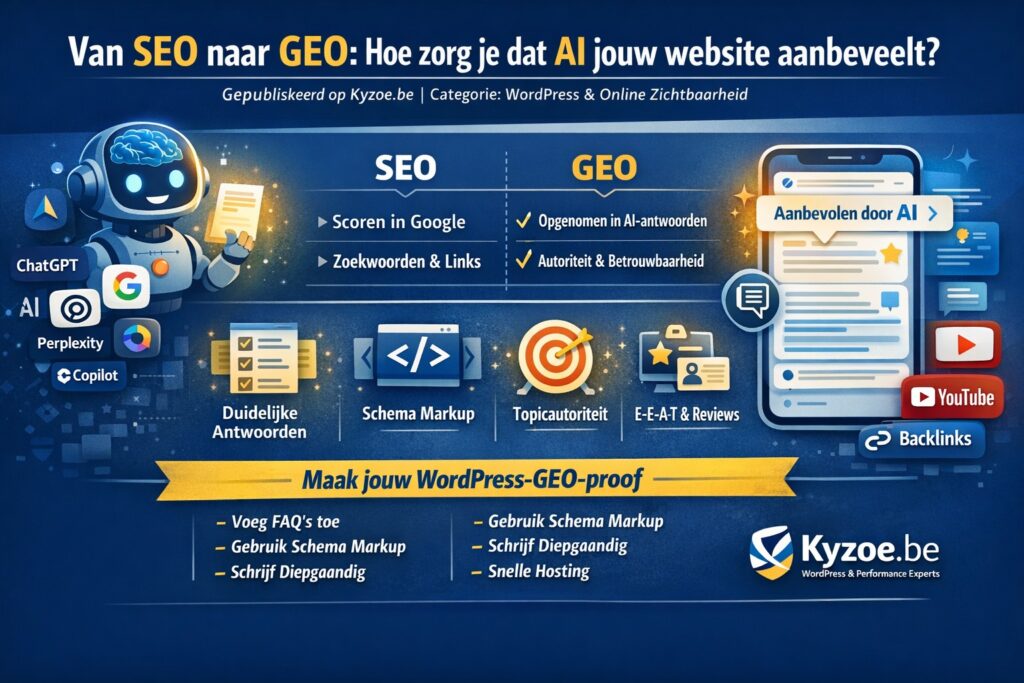
Google has long ceased to be the only gateway to your website. ChatGPT, Google’s AI Overviews, Perplexity, Copilot — more and more people are asking their questions to AI models instead of traditional search engines. And that AI simply gives an answer. Not a list of blue links, but one concrete answer. If your website doesn’t appear in it, you don’t exist.
Welcome to the era of GEO: Generative Engine Optimization.
What is the difference between SEO and GEO?
| SEO | GEO | |
|---|---|---|
| Goal | Ranking in Google (clicks to your site) | Being included in AI answers |
| Measured by | Rankings, organic traffic | Mentions in AI tools |
| Focus | Keywords, technology, links | Authority, structure, reliability |
In short: SEO makes people click on your link. GEO makes an AI give your answer to the user — with or without mentioning your name.
How do you get your WordPress website ready for AI search engines?
1. Answer questions directly and concretely
AI models pull information from content that answers questions. Not vague marketing copy, but clear, factual answers. Think of:
- FAQ sections on your pages
- Blog titles starting with “What is…”, “How does… work”, “How much does… cost”
- Short, punchy intros that summarise the essence straight away
This also helps on a technical level: a well-structured WordPress site with clear H1 and H2 headings loads faster and is easier to index — both for Google and for AI crawlers.
2. Use Schema Markup (structured data)
This may well be the most important technical step. Schema markup tells search engines and AI models what your content means, not just what it says. For WordPress sites it is relatively easy to implement via plugins such as Rank Math or Yoast, but for maximum results we recommend fine-tuning it manually as well.
Use at least:
- FAQPage schema for frequently asked questions
- Article schema for blog articles
- LocalBusiness schema if you operate locally
- Review/Rating schema for testimonials
A well-configured, fast hosting environment is crucial here — slow sites are crawled less often.
3. Build topical authority, not keyword lists
AI models trust sources that write in depth about a subject, not pages that try to cram in as many keywords as possible. Choose a niche, write about it extensively and connect your pages through internal links.
Example: are you writing about WordPress security? Then also create separate, linked pages about SSL, firewalls, backups and updates. That way you build a knowledge network that AI recognises as authoritative.
4. Ensure E-E-A-T: prove that you are an expert
Google and AI systems use the E-E-A-T principle: Experience, Expertise, Authoritativeness, Trustworthiness. In practice, this means:
- Add an author bio to your blog posts
- Mention certifications and partnerships (e.g. LiteSpeed Partner, BunnyCDN reseller)
- Actively collect and display customer reviews
- Publish original data or case studies, not rehashed information
5. Increase your off-site presence
AI models don’t just index your website, but also what is said about you. Make sure your name or brand appears on:
- Relevant forums and communities (e.g. WordPress.org, Tweakers, Webhostingtalk)
- Industry news sites and blogs
- YouTube (videos are cited remarkably often in AI answers)
Good PR and high-quality backlinks therefore remain relevant — but now not just for Google, for AI as well.
The technical foundation must not be missing
AI crawlers don’t work well if your site is slow, poorly configured or blocked by an overly strict WAF. A number of technical requirements:
- Fast loading times through good hosting, caching (LiteSpeed/Object Cache) and a CDN
- Correct robots.txt — don’t block content you want to have indexed
- HTTPS — a must for any form of trust
- Mobile-friendly — AI models also pick up mobile traffic
At Kyzoe we make sure the technical foundation of your WordPress environment is GEO-proof: from server configuration and LiteSpeed caching to BunnyCDN integration and security optimisation.
Conclusion: start with GEO today
SEO is not dead — but it is no longer enough. The combination of good SEO and a targeted GEO strategy determines whether your business remains visible in the years ahead, even in a world where AI dictates the answers.
Practical first steps:
- Add an FAQ section to your most important pages
- Install and configure Schema Markup correctly
- Write at least one in-depth article about your core topic
- Make sure your site loads lightning fast (we can help you with that)
Want to know how your WordPress site scores on GEO readiness? Contact Kyzoe for a technical analysis.
Kyzoe.be helps entrepreneurs and SMEs with fast, secure WordPress hosting and performance optimisation. From VPS configuration to CDN and caching — we make sure your website is ready for the future.
Read also

A website of your own for your cultural organisation: web hosting with 50% off
Do you work in culture? Then Kyzoe gives you 50% off web hosting or WordPress hosting in the first year and 33%…
Read more
Novamira: an AI agent working directly in your WordPress site
With Novamira, an AI agent such as Claude or Cursor works directly in WordPress. What it can do, what Pro adds, how…
Read more
Updates to our hosting panel in September 2026
Four Enhance updates in September 2026: faster disk usage, Roundcube 1.6.18, LiteSpeed 6.3.7, custom DNS resolvers and more reliable migrations from cPanel…
Read more